华为手机如何关闭智能切换上网卡
1、点击移动网络
在手机设置界面,点击移动网络选项。

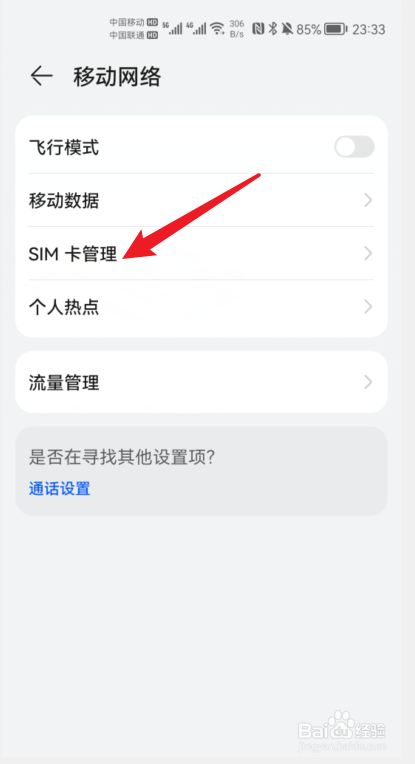
2、点击SIM卡管理
在移动网络界面点击SIM卡管理。
3、点击智能切换上网卡
点击智能切换上网卡右侧的开关。
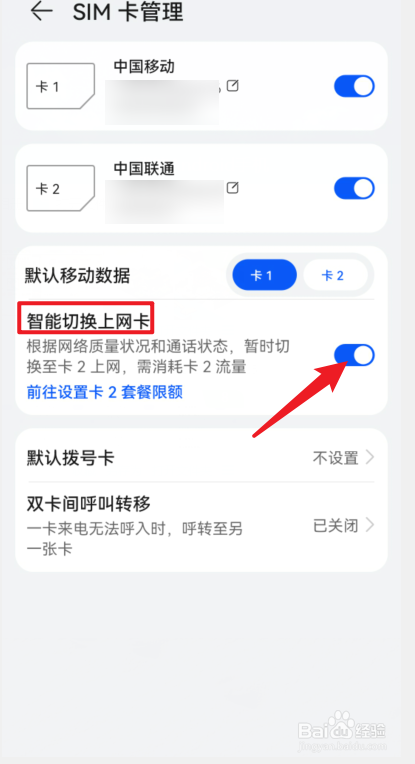
4、关闭智能切换上网卡
将智能切换上网卡右侧的开关闭即可。

阅读量:129
阅读量:76
阅读量:35
阅读量:42
阅读量:125
1、点击移动网络
在手机设置界面,点击移动网络选项。
2、点击SIM卡管理
在移动网络界面点击SIM卡管理。
3、点击智能切换上网卡
点击智能切换上网卡右侧的开关。
4、关闭智能切换上网卡
将智能切换上网卡右侧的开关闭即可。