怎么设置时光小屋APP仅在WiFi下上传?
1、打开时光小屋。

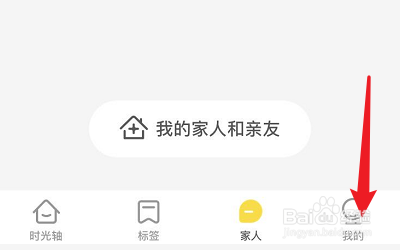
2、点击我的。
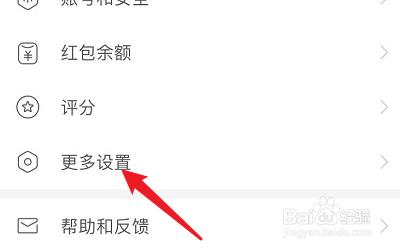
3、点击更多设置。
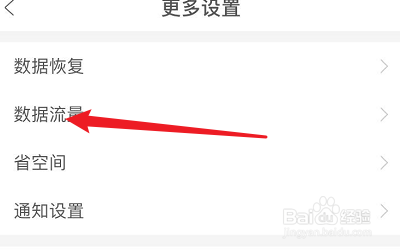
4、点击数据流量。
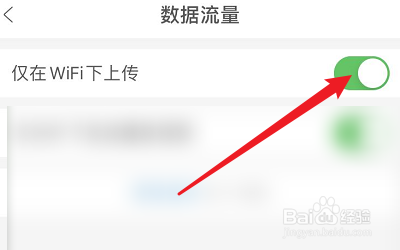
5、点击仅在WiFi下上传。
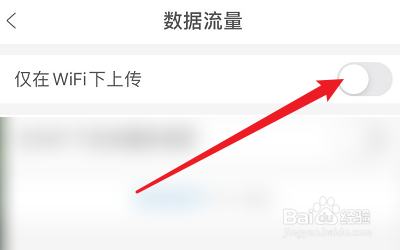
6、打开仅在WiFi下上传。
1、1、打开时光小屋。
2、点击我的。
3、点击更多设置。
4、点击数据流量。
5、点击仅在WiFi下上传。
6、打开仅在WiFi下上传。
阅读量:149
阅读量:145
阅读量:162
阅读量:167
阅读量:20
1、打开时光小屋。
2、点击我的。
3、点击更多设置。
4、点击数据流量。
5、点击仅在WiFi下上传。
6、打开仅在WiFi下上传。
1、1、打开时光小屋。
2、点击我的。
3、点击更多设置。
4、点击数据流量。
5、点击仅在WiFi下上传。
6、打开仅在WiFi下上传。