公式编辑器Math Type加载到word中的步骤
大家在使用word编辑公式时,往往都要用到Math Type这个强大的公式编辑器,在Math Type安装完成之后,并没有加载到word下,这样一般我们都会通过“插入”来调出Math Type,其实它是可以加载到word中,显示到word的界面上的,下面小编简单介绍一下怎样将Math Type加载到word中的步骤。
工具/原料
word 2003/2007/2010
Math Type 各种版本
步骤:
单击“office按钮”,之后在出来的界面上单击“word选项”。

点击“加载项”选项。

在管理的下拉框中,点击“word加载项”,之后单击:“转到”。

将“MathType”勾选,单击“确定”。


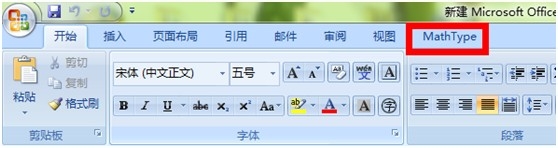
这样word中就可以显示“MathType”功能了O(∩_∩)O~
阅读量:161
阅读量:188
阅读量:34
阅读量:56
阅读量:156