Bluetooth驱动程序怎么更新?
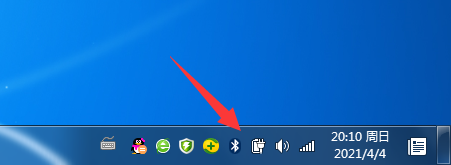
1、电脑右下角点击Bluetooth图标。
2、在Bluetooth设置下,点击选项。

3、继续选择属性。

4、在属性中,选择驱动程序选项。

5、继续点击更新驱动程序,即可为这个设备更新驱动程序软件。

阅读量:134
阅读量:56
阅读量:51
阅读量:105
阅读量:59
1、电脑右下角点击Bluetooth图标。
2、在Bluetooth设置下,点击选项。
3、继续选择属性。
4、在属性中,选择驱动程序选项。
5、继续点击更新驱动程序,即可为这个设备更新驱动程序软件。