C# 将PPT幻灯片转为高质量图片
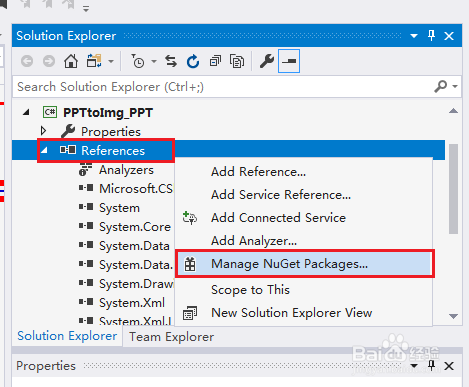
1、在VisualStudio 中打开【解决方案资源管理器】,鼠标右键点击【引用】,选择【管理NuGet包】:
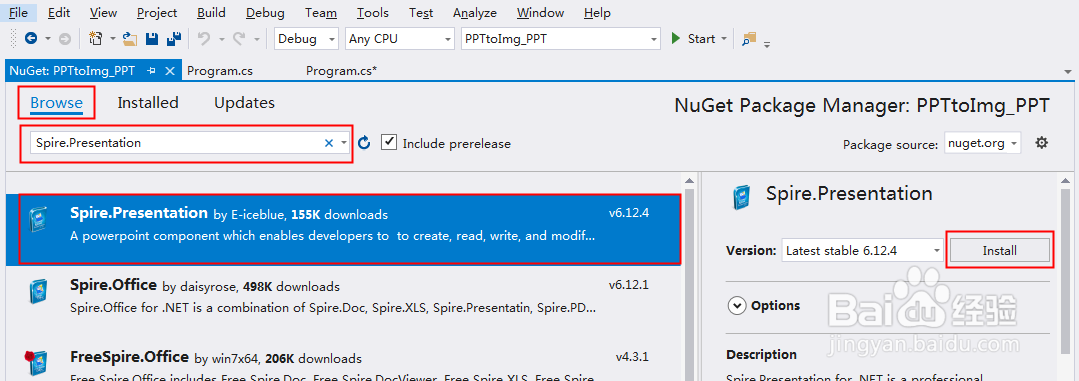
2、选择【浏览】-在搜索框中输入-选中搜索结果-点击【安装】:
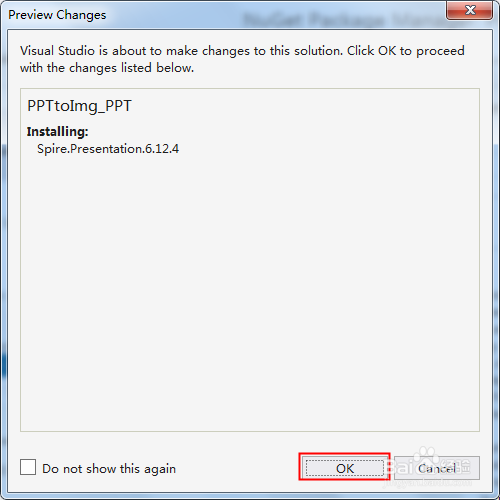
3、点击【OK】:
4、点击【我接受】,等待程序安装完成:

1、using Spire.Presentation;
using System.Drawing;
using System.Drawing.Imaging;
namespace PPTtoImg_PPT
{
class Program
{
static void Main(string[] args)
{
//创建Presentation类实例,并加载文件
Presentation presentation = new Presentation();
presentation.LoadFromFile("test.pptx");
//设置图片质量
presentation.HighQualityImage = true;
//遍历所有幻灯片,保存为指定格式的图片
for (int i = 0; i < presentation.Slides.Count; i++)
{
Image image = presentation.Slides[i].SaveAsImage();
image.Save(string.Format("result-img-{0}.png", i), ImageFormat.Png);
}
}
}
}
2、执行程序,将幻灯片保存为图片到指定路径。这里的图片路径可以自定义。