C# 将html转为xml
1、在VS程序中打开“解决方案资源管理器”,鼠标右键点击“引用”,“管理NuGet包”。
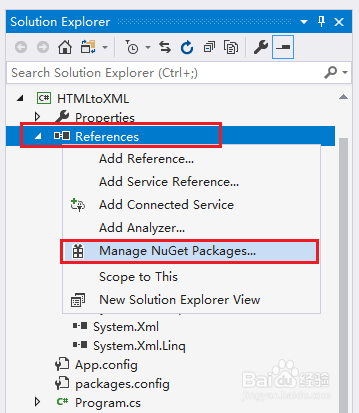
2、点击“搜索”,在搜索框中输入“Free Spire.Doc”,点击包,选择安装。
3、安装完成后,编辑如下代码:
using Spire.Doc;
namespace HTMLtoXML
{
class Program
{
static void Main(string[] args)
{
//创建Document类的对象
Document doc = new Document();
//加载html文件
doc.LoadFromFile("sample.html",FileFormat.Html);
//保存为xml格式
doc.SaveToFile("HTMLtoXML.xml", FileFormat.Xml);
}
}
}
4、执行以上代码,生成结果文档。代码中的文件路径为程序的debug路径,文件路径可自定义为其他路径。
阅读量:68
阅读量:170
阅读量:127
阅读量:127
阅读量:60