excel表格怎样设置滚动区域
1、点击开发工具
点击上面的【开发工具】。

2、点击插入
点击上面的【插入】。

3、点击滚动条窗体控件
弹出白色框,点击【滚动条(窗体控件)】。

4、选中滚动条
选中需要的滚动条。

5、点击设置控件格式
用鼠标右键点击【设置控件格式】。

6、选中单元格链接
选中需要的单元格链接。
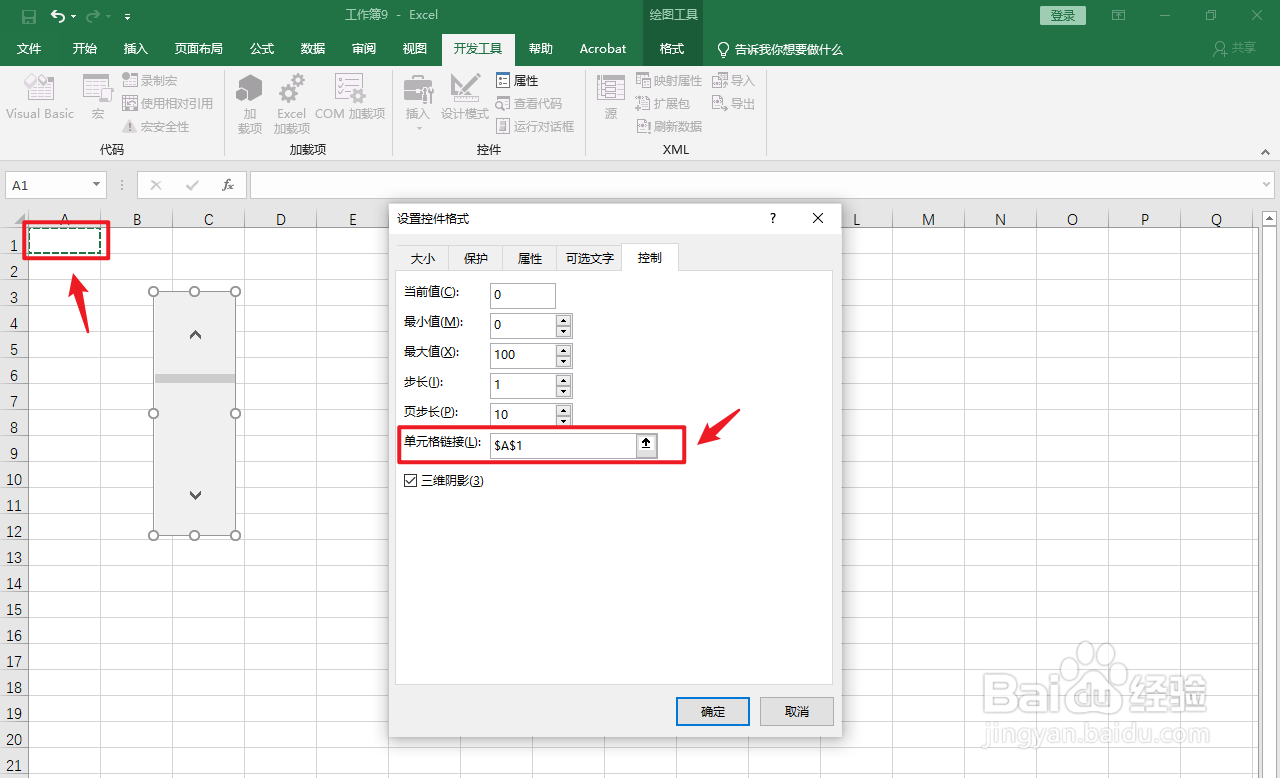
7、点击确定
点击右下角的【确定】即可。

阅读量:80
阅读量:158
阅读量:40
阅读量:173
阅读量:100
1、点击开发工具
点击上面的【开发工具】。
2、点击插入
点击上面的【插入】。
3、点击滚动条窗体控件
弹出白色框,点击【滚动条(窗体控件)】。
4、选中滚动条
选中需要的滚动条。
5、点击设置控件格式
用鼠标右键点击【设置控件格式】。
6、选中单元格链接
选中需要的单元格链接。
7、点击确定
点击右下角的【确定】即可。