指南经验网
首页
美食营养
生活百科
知识问答
生活知识
返回
指南经验网
首页
美食营养
游戏数码
手工爱好
生活知识
生活百科
健康养生
运动户外
职场理财
情感交际
母婴教育
时尚美容
知识问答
更多知识
搜索
苹果手机如何关闭可用性提醒
2026-04-24 12:49:52
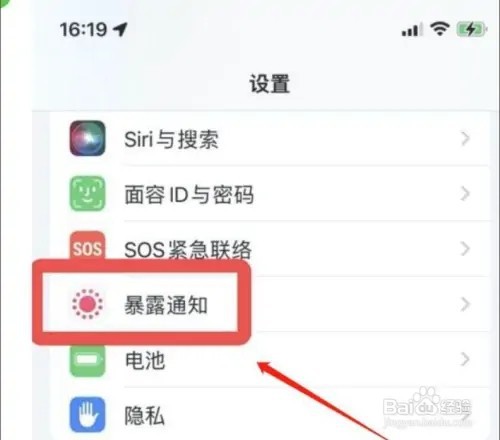
1、先打开手机点击进入设置,点击【暴露通知】。
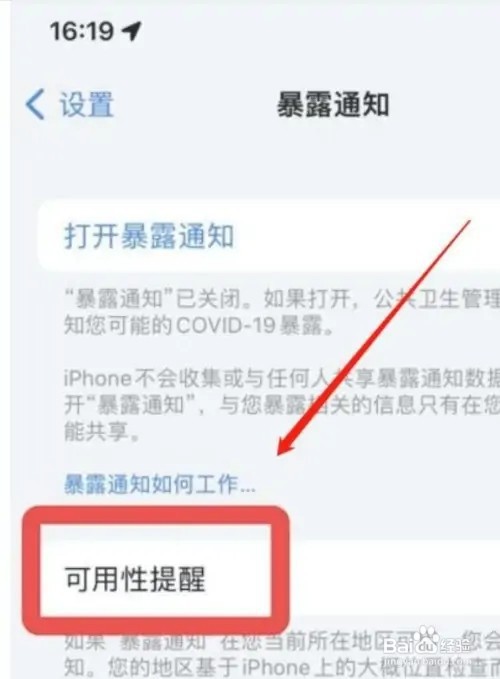
2、然后点击【可用性提醒】界面。
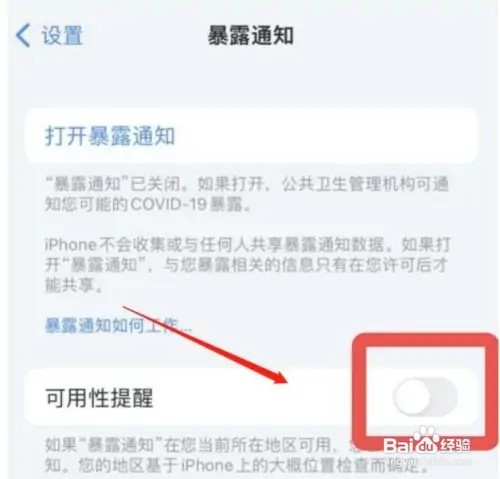
3、最后点击关闭【可用性提醒】即可。
相关推荐
苹果13手机自动调节屏幕亮度功能怎么设置?
阅读量:80
苹果app跟踪打开好还是不打开好
阅读量:143
由于iphone温度异常,充电曾暂停
阅读量:161
苹果12用哪个版本系统最好
阅读量:118
苹果手机怎么开启暴露通知
阅读量:139
猜你喜欢
指甲凹陷是怎么回事
皮鞋怎么保养
怎么给u盘加密
充电宝怎么用
网站怎么推广
草字头加官怎么读
调研报告怎么写
微信群怎么拍一拍
牙龈疼怎么办
唐朝是怎么灭亡的
猜你喜欢
宝宝红屁股怎么办
细小怎么治
打麻将怎么才能赢
九里香怎么养
拉芳洗发水怎么样
怎么删除qq聊天记录
唯品会怎么退货
怎么刻录光盘
怎么才能瘦脸
应聘自我介绍怎么说