html中redio单选框与文字对齐方法
1、打开VSCode前端工具,新建html页面,输入
<div class="analysis-redio">
<span class="title">时间<input type="radio" name="period" checked="checked" class="conent" value="0" v-model='date.period'/></span>
<span class="title">季度<input type="radio" name="period" checked="" class="conent" value="1" v-model='date.period'/></span>
</div>

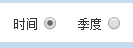
2、不处理的效果,可以看到radio与文字是不在一条水平线上的,这时你margin-top,margin-bottom都是不起作用的

1、在每个radio上加上样式
vertical-align: middle;
margin-top: -2px;
margin-bottom: 1px;

2、vertical-align 是设置 属性元素的垂直对齐方式,middle属性是此元素放置在父元素的中部,效果就对齐了
阅读量:63
阅读量:107
阅读量:54
阅读量:57
阅读量:160