如何office2010设置ppt尺寸比例
1、我们设置ppt的时候默认比例是4:3
但是这个比例在播放的时候是不能够全屏的
左图:4:3 右图:16:9


2、首先打开Office2010->ppt进入页面,找到“设计”选项卡

3、点开“设计”选项卡下面
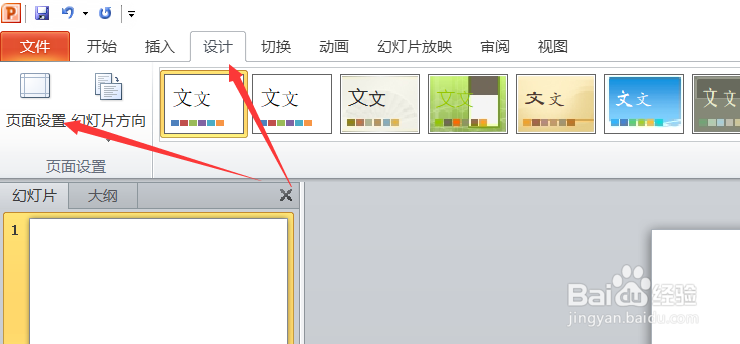
4、点击这里就可以调整:
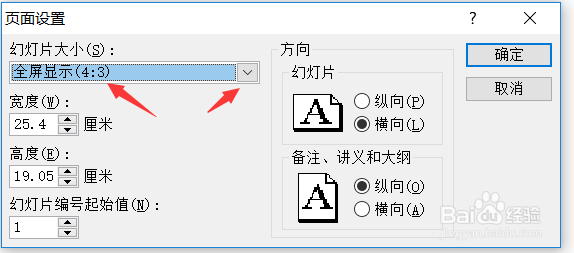
5、调整成为16:9

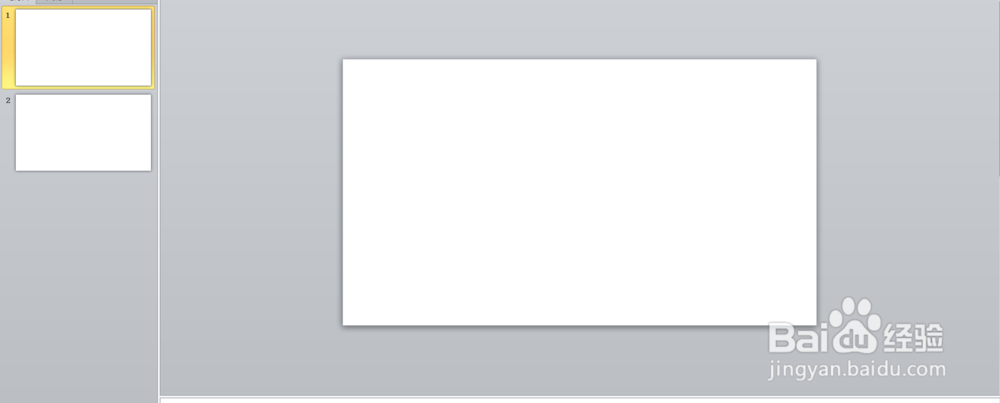
6、也可以看到页面 比例的变化
阅读量:81
阅读量:104
阅读量:67
阅读量:89
阅读量:110
1、我们设置ppt的时候默认比例是4:3
但是这个比例在播放的时候是不能够全屏的
左图:4:3 右图:16:9
2、首先打开Office2010->ppt进入页面,找到“设计”选项卡
3、点开“设计”选项卡下面
4、点击这里就可以调整:
5、调整成为16:9
6、也可以看到页面 比例的变化