UltraEdit怎么关闭数字显示中如同新行统计换行
1、首先,需要打开一个 UltraEdit 的界面中
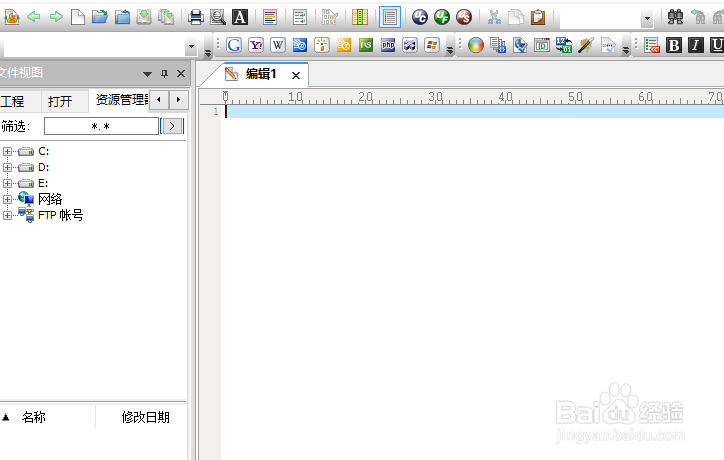
2、然后点击 UltraEdit 菜单中的 高级 菜单

3、点击了 高级 菜单之后,弹出了下拉菜单选中为 配置 选项

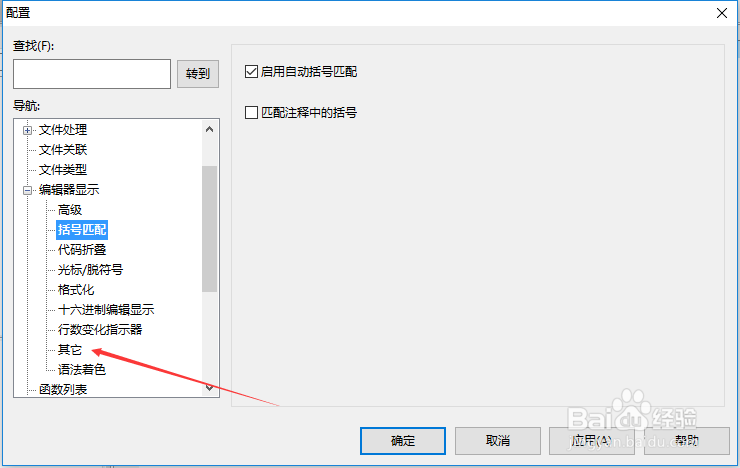
4、进入到了 配置 界面中,点击 其它 选项
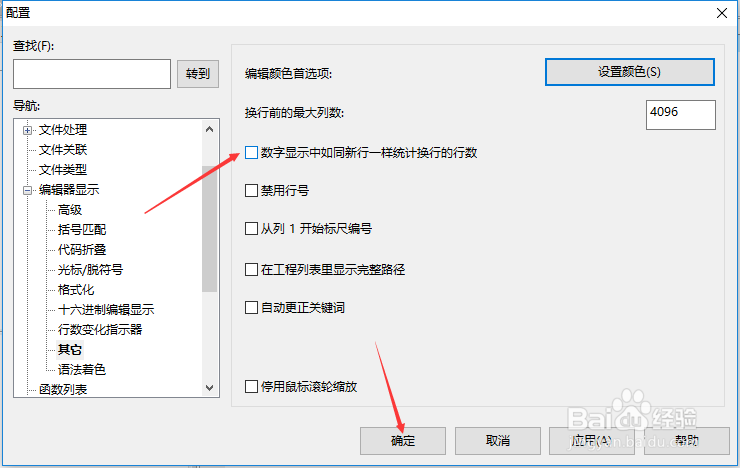
5、进入到了 其它 界面中,去掉勾选上 数字显示中如同新行统计换行 选项

6、去掉勾选上 数字显示中如同新行统计换行 选项之后,点击 确定
1、首先,需要打开一个 UltraEdit 的界面中
2、然后点击 UltraEdit 菜单中的 高级 菜单
3、点击了 高级 菜单之后,弹出了下拉菜单选中为 配置 选项
4、进入到了 配置 界面中,点击 其它 选项
5、进入到了 其它 界面中,去掉勾选上 数字显示中如同新行统计换行 选项
6、去掉勾选上 数字显示中如同新行统计换行 选项之后,点击 确定