如何设置PhotoLine软件鼠标滚轮滚动速度
1、点击“PhotoLine”

2、在“PhotoLine”窗口中,点击“编辑”
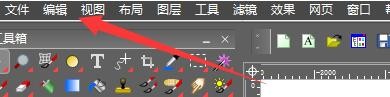
3、在弹出下拉栏中,点击“选项”

4、在“选项”窗口中,点击“鼠标指针”

5、在“鼠标指针”窗口中,设置滚轮滚动速度,如:设置速度为0.5

6、点击“确定”即可

阅读量:77
阅读量:172
阅读量:186
阅读量:133
阅读量:132
1、点击“PhotoLine”
2、在“PhotoLine”窗口中,点击“编辑”
3、在弹出下拉栏中,点击“选项”
4、在“选项”窗口中,点击“鼠标指针”
5、在“鼠标指针”窗口中,设置滚轮滚动速度,如:设置速度为0.5
6、点击“确定”即可