指南经验网
首页
美食营养
生活百科
知识问答
生活知识
返回
指南经验网
首页
美食营养
游戏数码
手工爱好
生活知识
生活百科
健康养生
运动户外
职场理财
情感交际
母婴教育
时尚美容
知识问答
更多知识
搜索
苹果电脑版本微信怎么设置使用回车键来发送消息
2026-05-06 17:14:01
1、打开微信。
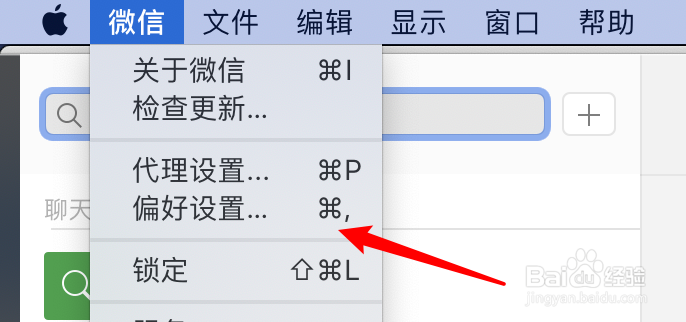
2、点击上方的微信菜单。
3、点击偏好设置。
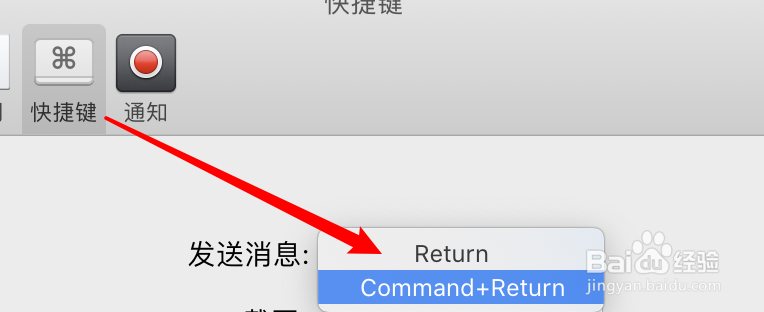
4、点击快捷键。
5、点击发送消息下拉框。
6、选择回车键即可。
相关推荐
苹果电脑Safari浏览器怎么修改下载位置
阅读量:84
macbook pro中如何安装字体
阅读量:153
Mac,pages如何使用格式刷?
阅读量:109
Mac电脑如何修改共享时显示的名称
阅读量:176
mac截图快捷键
阅读量:192
猜你喜欢
长安逸动怎么样
斗鱼直播怎么赚钱
ipad怎么激活
乳腺炎怎么办
大闸蟹怎么做
手上起小水泡是怎么回事
肝上有囊肿怎么办
凉席怎么洗
shift怎么读
排列组合怎么算
猜你喜欢
安易贷怎么样
怎么更改电脑开机密码
苹果怎么设置黑名单
工作心得怎么写
怎么拼接图片
hermes怎么读
自来也怎么死的
被仓鼠咬了怎么办
卷心菜怎么做好吃
威狮轮胎质量怎么样