指南经验网
首页
美食营养
生活百科
知识问答
生活知识
返回
指南经验网
首页
美食营养
游戏数码
手工爱好
生活知识
生活百科
健康养生
运动户外
职场理财
情感交际
母婴教育
时尚美容
知识问答
更多知识
搜索
朝暮计划app如何更改纪念日背景图
2026-04-22 08:26:20
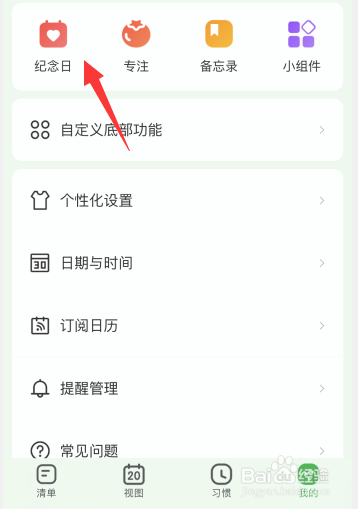
1、进入朝暮计划app我的页面,点击【纪念日】。
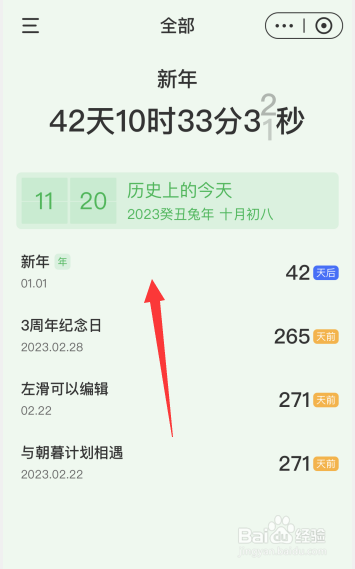
2、点击要修改背景的纪念日。
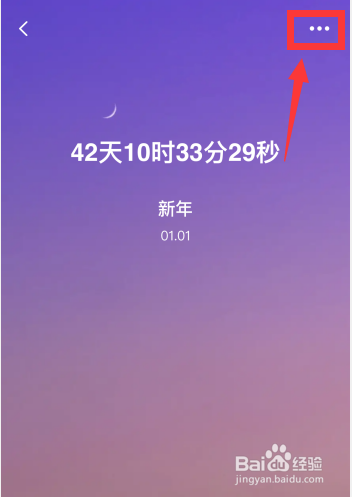
3、点击右上角【...】。
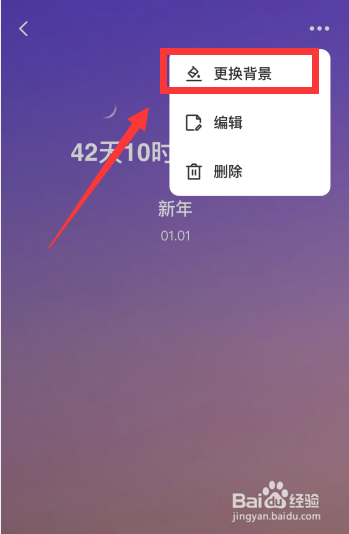
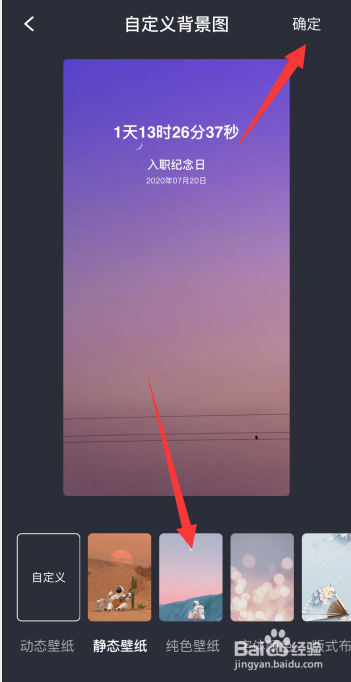
4、点击【更换背景】,选择背景图,点击右上角【确定】,即可完成本次更改。
相关推荐
朝暮计划怎么设置纪念日?
阅读量:190
朝暮计划app如何更改习惯打卡开始日期
阅读量:150
朝暮计划app上如何添加纪念日倒计时
阅读量:57
朝暮计划app如何删除创建的纪念日
阅读量:41
朝暮计划app如何创建纪念日
阅读量:76
猜你喜欢
未婚先孕怎么办
睡觉流口水是怎么回事
万用表怎么测电容
金项链怎么清洗
智齿牙龈肿痛怎么办
腿关节疼是怎么回事
dnf心意点怎么获得
删除账单要人脸识别怎么解除
怎么打篮球
怎么减肥肚子和腿
猜你喜欢
qq号被盗了怎么办
怎么煮饭
瘪怎么读
脚麻怎么办
清蒸鱼怎么做好吃
word底纹怎么设置
细小怎么治
瑞倪维儿化妆品怎么样
平方怎么打出来
ps怎么保存