怎样修改endnote插入文献出现的失效格式{,#8}
1、打开需要修改的word文件

2、查看文件中的错误代码
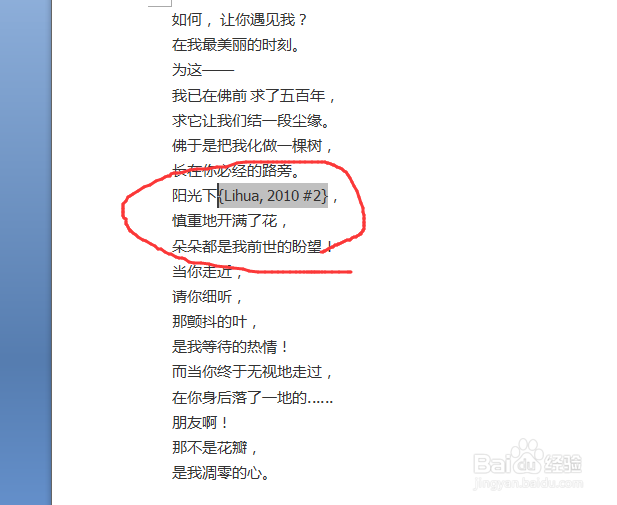
3、在word中找到endnote工作表

4、打开endnote工作表
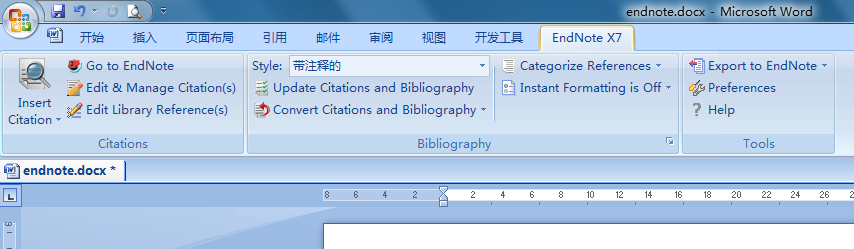
5、点击工作表中的选择需要的文献插入格式
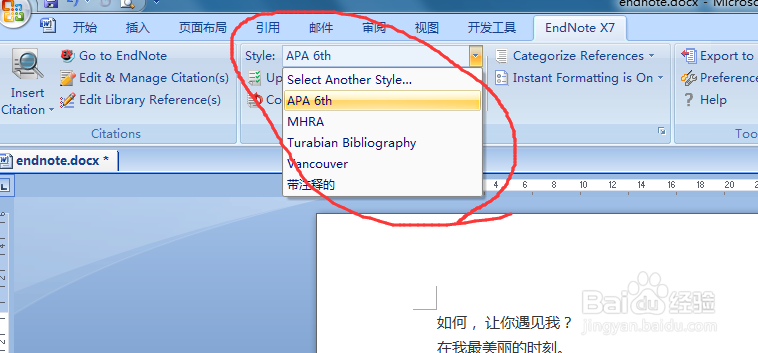
6、选择好文献插入格式后,点击Update Citations and Bibliography

7、文献格式重新刷新,并自动更新为新格式

阅读量:151
阅读量:169
阅读量:68
阅读量:120
阅读量:74
1、打开需要修改的word文件
2、查看文件中的错误代码
3、在word中找到endnote工作表
4、打开endnote工作表
5、点击工作表中的选择需要的文献插入格式
6、选择好文献插入格式后,点击Update Citations and Bibliography
7、文献格式重新刷新,并自动更新为新格式