指南经验网
首页
美食营养
生活百科
知识问答
生活知识
返回
指南经验网
首页
美食营养
游戏数码
手工爱好
生活知识
生活百科
健康养生
运动户外
职场理财
情感交际
母婴教育
时尚美容
知识问答
更多知识
搜索
Excel中怎么设置表格的边框
2026-04-21 22:49:30
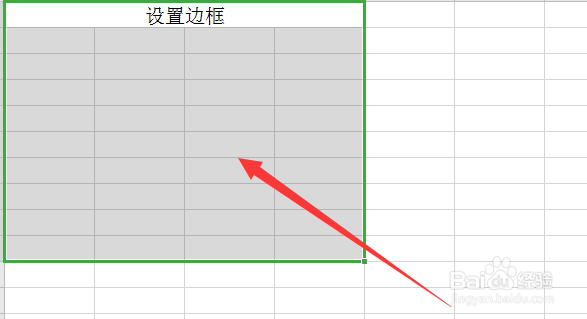
1、打开Excel表格,选中要设置边框的区域
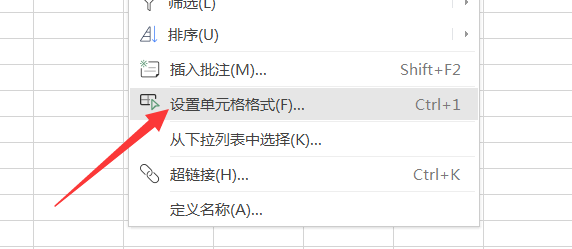
2、再单击鼠标右键,选择设置单元格格式
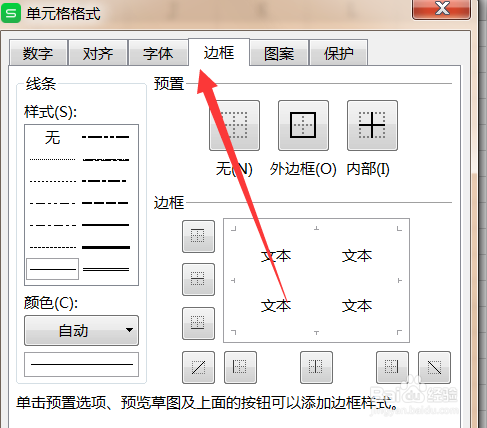
3、在弹出的对话框里选择边框
4、再进行内外边框的设置,点击确定即可完成
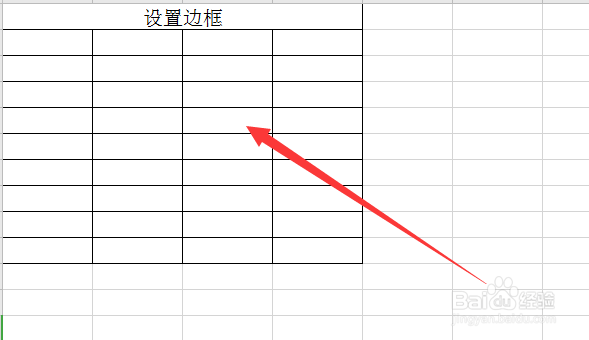
5、看最终效果
相关推荐
如何在excel表格里面插入一行或插入一列
阅读量:51
Excel表格插入一列
阅读量:93
excel怎么移动一行到另一行
阅读量:90
excel在两列单元格中间再加一列单元格要怎么弄
阅读量:92
excel表格行高和列宽各是多少厘米如何查看
阅读量:191
猜你喜欢
如何激活win10
老年人生活
学会生活
如何选购钻石
如何缴纳个人所得税
hold是什么意思
如何剥生板栗
浙江交通职业技术学院怎么样
生活中的数字
怎么去丽江
猜你喜欢
沉木怎么处理
汽车年审过期怎么办
江苏信息职业技术学院怎么样
ix25怎么样
如何领取失业保险金
快活的反义词是什么
消防工程师证报考条件是什么
如何把文件压缩到最小
如何写自我评价
菊花怎么养殖方法