wps文字表格中文字怎么居中
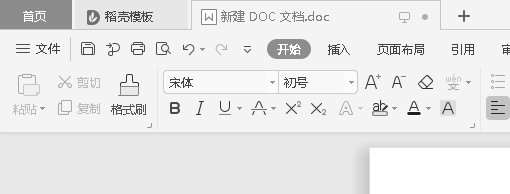
1、我们打开wps文字11.1.0.9339
进入下图界面
2、我们输入下图的表格
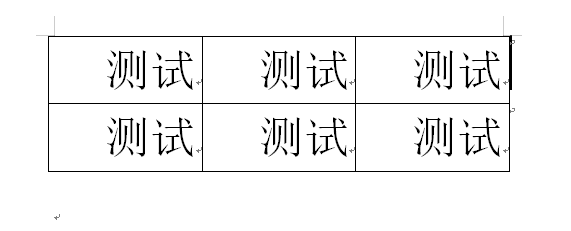
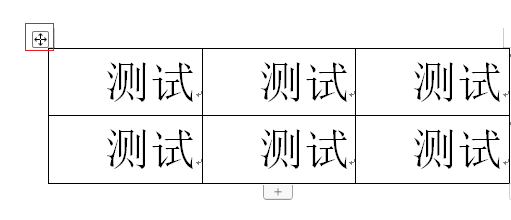
3、我们点击下图框内 图标
全选整张表格
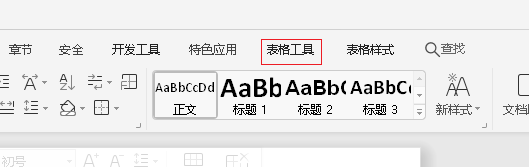
4、我们点击下图框内 表格工具
5、我们点击下图框内
选项
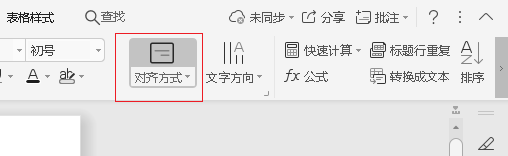
6、我们选中下图框内 选项

7、这样如下图就对wps文字表格对齐方式
进行调整了
文字整体居中了

阅读量:53
阅读量:126
阅读量:127
阅读量:195
阅读量:138
1、我们打开wps文字11.1.0.9339
进入下图界面
2、我们输入下图的表格
3、我们点击下图框内 图标
全选整张表格
4、我们点击下图框内 表格工具
5、我们点击下图框内
选项
6、我们选中下图框内 选项
7、这样如下图就对wps文字表格对齐方式
进行调整了
文字整体居中了