PowerShape怎么关闭转换全部曲面为powersurface
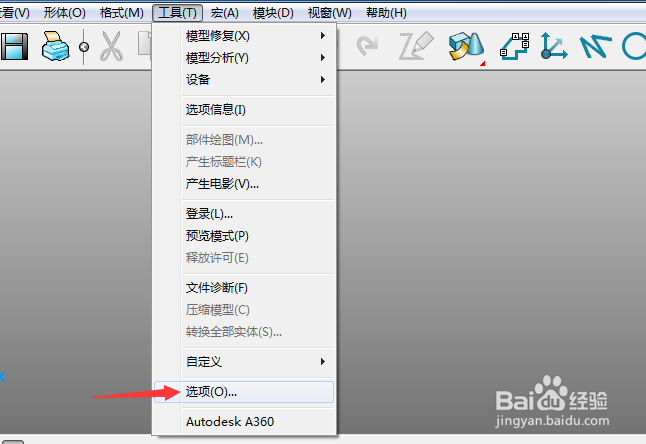
1、首先,点击菜单中的工具菜单,弹出了下拉菜单选中为选项
2、点击左侧中曲面选项
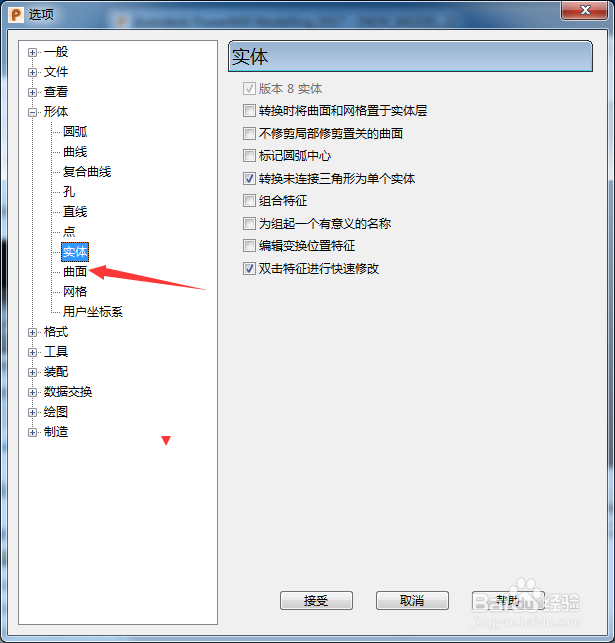
3、去掉勾选上转换全部曲面为powersurface选项

4、去掉勾选上转换全部曲面为powersurface选项之后,点击接受按钮

阅读量:72
阅读量:136
阅读量:194
阅读量:114
阅读量:90
1、首先,点击菜单中的工具菜单,弹出了下拉菜单选中为选项
2、点击左侧中曲面选项
3、去掉勾选上转换全部曲面为powersurface选项
4、去掉勾选上转换全部曲面为powersurface选项之后,点击接受按钮